

Wednesday, 25 Mar 2026
Subscribe
logo logo
  • Global
  • Technology
  • Business
  • AI
  • Cloud
  • Edge Computing
  • Security
  • Investment
  • More
    • Sustainability
    • Colocation
    • Quantum Computing
    • Regulation & Policy
    • Infrastructure
    • Power & Cooling
    • Design
    • Innovations
  • 🔥
  • data
  • revolutionizing
  • Stock
  • Investment
  • Future
  • Secures
  • Growth
  • Top
  • Funding
  • Power
  • Center
  • technology
Font ResizerAa
Silicon FlashSilicon Flash
Search
  • Global
  • Technology
  • Business
  • AI
  • Cloud
  • Edge Computing
  • Security
  • Investment
  • More
    • Sustainability
    • Colocation
    • Quantum Computing
    • Regulation & Policy
    • Infrastructure
    • Power & Cooling
    • Design
    • Innovations
Have an existing account? Sign In
Follow US
© 2022 Foxiz News Network. Ruby Design Company. All Rights Reserved.
Silicon Flash > Blog > Technology > Unlocking Hidden Android Features for a More Enjoyable Mobile Experience
Technology

Unlocking Hidden Android Features for a More Enjoyable Mobile Experience

Published December 5, 2025 By SiliconFlash Staff
Share
3 Min Read
Unlocking Hidden Android Features for a More Enjoyable Mobile Experience
SHARE
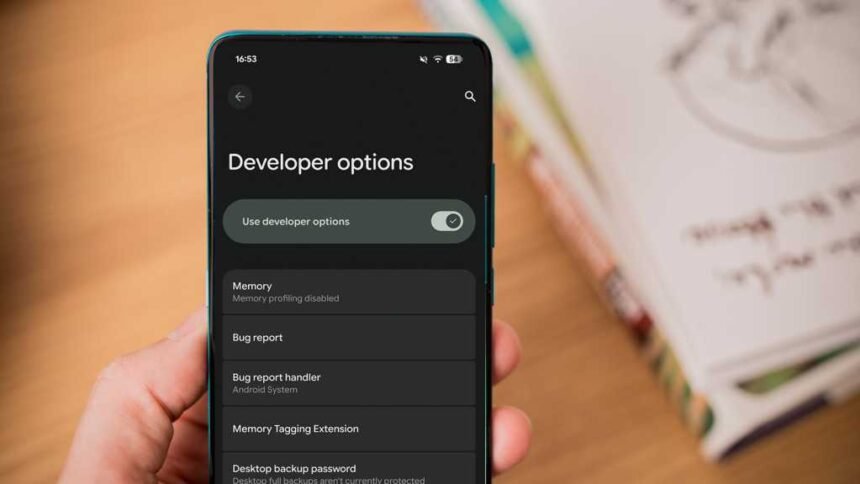
Think you’ve exhausted all the features in your Android smartphone’s Settings app? Think again. Deep within the Settings, there’s a hidden Developer menu with a plethora of settings to enhance your smartphone experience. Here are some developer settings that every Android user should consider enabling on their device.

How to activate the developer menu on your Android phone

To access the Developer settings, which are typically hidden for general users, you need to unlock the Developer menu. This can usually be done by tapping the Build Number in the About Phone section of the Settings app seven times. Once unlocked, you’ll see a message confirming your new developer status.

The location of the Developer menu may vary on different Android devices. On some phones, like the Pixel 10, it’s under the System option, while on Samsung Galaxy phones, it may be near the bottom of the Settings app. If you can’t find it manually, use the search function in the Settings app.

Display touch inputs

Enabling the Show Taps option in the Developer menu is useful for creating video tutorials on your Android device. This feature displays a translucent circle wherever you touch the screen, making it easier to highlight actions for viewers. You can find this toggle under the Input section in the Developer menu.

Customize USB connection behavior

To streamline the process of connecting your smartphone to a PC, consider setting a Default USB configuration in the Developer menu. This allows you to select a default action, such as File transfer or No data transfer, whenever you connect your device to a computer. Look for this option in the Networking section.

See also  The Hidden Drivers of Environmental Efficiency

Utilize split-screen for all apps

If you want to use split-screen functionality for all apps, even those that don’t natively support it, enable the Force activities to be resizable setting in the Window Management section of the Developer menu. This will enable the Split Screen option for all apps in your device’s app drawer.

Maximize display refresh rate

To ensure a consistent and optimal refresh rate on your device, consider enabling the Force peak refresh rate setting in the Developer menu. This setting keeps your device running at its highest supported refresh rate, providing a smoother experience. Keep in mind that this may slightly impact battery life.

Enhance performance with animation settings

For older smartphones, adjusting the Window Animation Scale and Transition Animation Scale settings in the Drawing section of the Developer menu can make animations faster and improve overall device speed. Experiment with different scale values to find the right balance.

For more Android tips and tricks, check out our articles on hidden camera features and unnecessary features to avoid. Stay tuned for more insightful content tailored for Android enthusiasts.


TAGGED: Android, Enjoyable, Experience, features, hidden, mobile, Unlocking
Share This Article
Facebook LinkedIn Email Copy Link Print
Previous Article Installed Building Products Sees Eminence’s Successful Exit After Year of Strong Performance Installed Building Products Sees Eminence’s Successful Exit After Year of Strong Performance
Next Article Unveiling the Value: Motorola Moto G06 – A Budget-friendly Smartphone Review Unveiling the Value: Motorola Moto G06 – A Budget-friendly Smartphone Review
Leave a comment

Leave a Reply Cancel reply

Your email address will not be published. Required fields are marked *

Your Trusted Source for Accurate and Timely Updates!

Our commitment to accuracy, impartiality, and delivering breaking news as it happens has earned us the trust of a vast audience. Stay ahead with real-time updates on the latest events, trends.
FacebookLike
LinkedInFollow

Popular Posts

Unlocking Infinite Possibilities: Telstra and Nokia Network APIs Empower Developers and Enterprises

Summary: Telstra and Nokia have partnered to provide developers with safe access to network APIs…

June 24, 2025

Amazon’s Stock Plummets as Jassy Announces $200B Capital Spending Plan

Amazon experienced a surge in revenue and cloud growth in the fourth quarter, setting a…

February 6, 2026

Strong EBITDA Growth Propels Methode Forward

Summary: Methode Electronics reported its fiscal first quarter 2026 results, showing progress in operating execution…

September 9, 2025

Optimizing Performance and Efficiency: The Core Principles of Edge Computing Design

Written by Martin Ryder, channel sales director for Northern Europe at Vertiv In the current…

November 3, 2025

The Next Big Contender: How This Unstoppable Stock Will Reach the $3 Trillion Club Alongside Nvidia, Apple, Microsoft, and Alphabet by 2029

Summary: 1. Meta Platforms is positioned for significant growth and potential membership in the exclusive…

October 28, 2025

You Might Also Like

Motorola Slimline: A Flagship Review
Technology

Motorola Slimline: A Flagship Review

SiliconFlash Staff
Exclusive Look: Nothing Phone (4a) Full Specifications Revealed
Technology

Exclusive Look: Nothing Phone (4a) Full Specifications Revealed

SiliconFlash Staff
Introducing Dyson’s Sleek PencilWash: A Revolutionary Wet Floor Cleaner Coming Soon
Technology

Introducing Dyson’s Sleek PencilWash: A Revolutionary Wet Floor Cleaner Coming Soon

SiliconFlash Staff
Google Pixel 9: The Ultimate Value Over Pixel 10
Technology

Google Pixel 9: The Ultimate Value Over Pixel 10

SiliconFlash Staff
logo logo
Facebook Linkedin Rss

About US

Silicon Flash: Stay informed with the latest Tech News, Innovations, Gadgets, AI, Data Center, and Industry trends from around the world—all in one place.

Top Categories
  • Technology
  • Business
  • Innovations
  • Investments
Usefull Links
  • Home
  • Contact
  • Privacy Policy
  • Terms & Conditions

© 2025 – siliconflash.com – All rights reserved

Welcome Back!

Sign in to your account

Lost your password?