The OnePlus Pad Go 2 impresses with its large, bright display and excellent battery life. It’s more powerful than its predecessor, and it’ll handle day-to-day tasks with ease, but it might not have enough grunt for keen gamers. A 5G-connected option sweetens the deal, and makes for a very tempting iPad alternative.
Price When Reviewed
This value will show the geolocated pricing text for product undefined
Best Pricing Today
We absolutely loved the OnePlus Pad 3. It’s a tablet that really gives you a lot for an asking price of just over £500 – but what if you want something more affordable? The OnePlus Pad Lite is another option. It’s much cheaper and features the same great software, but it might cut too many corners to provide a premium experience.
That’s where the OnePlus Pad Go 2 comes in. It inherits some of the features that make the Pad 3 so great, and has meaningful advantages over the Lite model. For a lot of people, it could be the sweet spot.
I’ve been testing it out for the past week to find out what it’s like use on a daily basis, and how it compares to its predecessor. Here’s what I’ve learned.
Design & Build
Plastic frame, matt finish
Shadow Black and Lavender Drift options
Wi-Fi version 597g, 5G version 599g
The design of the OnePlus Pad Go 2 has changed quite dramatically from the previous generation. The camera, which was once centrally placed, has been pushed up into a more typical position in the corner, and the two-tone rear has gone, too. You now get a uniform color across the entire back panel.
The Pad Go 2 is available in two colors. I have the Shadow Black version for testing. It’s a pretty anonymous-looking tablet with a matt black finish all over. It’s wholly inoffensive, but it lacks the personality of its predecessor, and it’s a bit of a smudge-magnet. Some are sure to prefer this new minimal design, but the older model was more appealing to me.
If you opt for the Lavender Drift option, you can expect a more eye-catching finish. OnePlus says it features precision-etched grooves that make the color shift as the light hits it. Unfortunately, I haven’t seen it in person, so I’ll have to take the brand’s word for it.
The frame seems to be made from plastic this time around, as there are no visible antenna lines, which were present on the original. It certainly feels hardy enough, though, and there’s no noticeable flex, despite the tablet being on the slim side.
With a 12.1-inch display, up from 11.35-inch, it’s noticeably bigger than the old model, and it’s fairly heavy, too. Of course, this comes with the territory, and in terms of weight, it sits right between the 11-inch and 13-inch iPad Air models.
One big change this generation is that you can opt for a model with 5G cellular connectivity, rather than just Wi-Fi. As a result, there’s now a SIM card tray, and there’s still room for a microSD card to expand the tablet’s storage, too.
Elsewhere, you’ll find the usual combination of a power button, volume rocker and USB-C port. There’s still no headphone socket, and no fingerprint-reading capabilities, either.
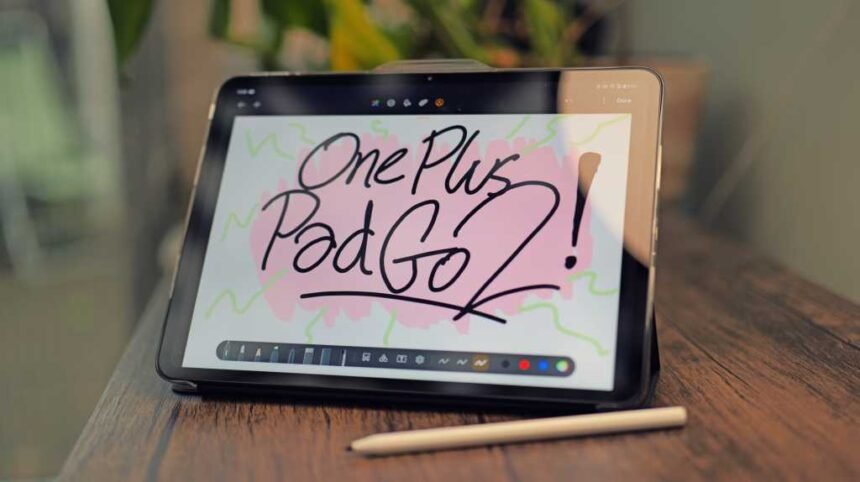
I was sent two optional accessories with the Pad Go 2: a folio case and an active stylus. The case has an interesting design, with a frosted, transparent, acrylic shell and a black, leather-effect, folding cover that doubles up as a kickstand. The case has ridges running across it; it’s very similar to the cases that RedMagic has been shipping with its phones lately, and it reminds me of privacy glass or a corrugated plastic roof. It’s certainly unique, and it feels very well constructed.
The stylus works well, with high responsiveness and minimal latency, but the design could be better. It doesn’t magnetize to the side of the tablet, instead relying on a plastic clasp that juts out from the side of the folio case. It doesn’t charge from the tablet, either; you’ll need to plug it in with a USB-C cable to juice it up once in a while. These are minor annoyances, but when you’re used to a magnetic wireless charging design, this one feels a little lacking.
Screen & Speakers
12.1-inch IPS LCD display
7:5, 2800×1980, 900 nits
Quad speakers
The new display is the single most impactful upgrade on the OnePlus Pad Go 2. I have already mentioned that it’s larger, but it’s also significantly brighter, has a faster refresh rate, and has better color accuracy.
To get into the finer details, this panel now maxes out at 900 nits, up from 400 nits, it’s 120Hz, up from 90Hz, and it has 12-bit color depth, up from 8-bit.
It’s a massive upgrade, and it makes the tablet feel so much more premium. Given that these devices are mostly used for media consumption, these display details really matter. Sure, OLED would have been nicer still, but given the price point, this IPS panel punches well above its weight.
For my needs, I have no complaints. The colors look vibrant and accurate, swiping around the OS feels as smooth as can be, and the contrast level is very, very good for an IPS display. I haven’t been contending with too much sunlight thanks to the dreary British weather, but the screen is more than bright enough around the house – and that’s where I use tablets the most.
The OnePlus Pad Go 2 features a quad-speaker arrangement with two speakers on the top, and two on the bottom (or left and right when held horizontally). The physical size of the tablet means there’s quite a pronounced stereo effect, which is great for watching TV and movies.
The speakers are fairly powerful, but they’re not the loudest I’ve come across. What impressed me the most was how “full” they sound; there’s a bit of weight to the low-end, and they never sound tinny. They get the job done nicely when watching content around the home.
Specs & Performance
MediaTek Dimensity 7300 Ultra
8GB RAM
128GB / 256GB storage
The OnePlus Pad Go 2 is powered by the MediaTek Dimensity 7300 Ultra, the same chip that we saw in the Poco X7 at the start of the year. It’s not going to rival the power of more premium tablets, but it’s a hefty upgrade compared to the Helio G99 processor in the original Pad Go and the G100 in the Pad Lite.
It comes with 8GB of RAM, and it can be paired with either 128GB or 256GB of onboard storage. Of course, since there’s a microSD card slot, you can expand that storage much further if you need to.
For basic tasks such as writing, sketching, watching videos and scrolling social media, the Pad Go 2 feels extremely quick and responsive. The majority of the time, I’d have trouble noticing the difference between this and a flagship chip.
It’s only when playing a graphically demanding game that this tablet starts to struggle. With Wuthering Waves, for example, I had to use the lowest preset and play at 30fps to get a smooth experience. That said, it’s a challenging game to run, and if you opt for something less graphically impressive, you’ll have a much better experience.
For gamers, there are many better options available, but if your performance requirements aren’t so high, you’ll have no problems with this tablet. For instance, I was able to play a high-res YouTube video in split-screen mode while answering emails on the other side, and the tablet barely broke a sweat.
OnePlus Pad Go 2 benchmarks
Cameras
8Mp rear camera
8Mp selfie camera
Up to 1080p 30fps video recording
No one expects the best of the best from tablet cameras, but with the OnePlus Pad Go 2, you should really temper your expectations further. There’s a single 8Mp camera on the rear, and one on the front, and neither is likely to impress very much.
The low resolution of these cameras is immediately apparent when you open up the camera app. With such a large display, the graininess and lack of detail are clear as can be. You can also record video at up to 1080p 30fps with either camera, and there’s not much in the way of stabilization.
There’s no autofocus on the selfie camera, which is to be expected with a tablet, but I was surprised to see that the rear camera also lacks autofocus.
That said, this is a tablet, so realistically, the cameras are only going to be used for video calls and scanning QR codes, and they’re absolutely fine for that. I appreciate that the front camera is placed in the center when held horizontally, as it makes for a very natural eyeline, especially when the tablet is propped up with a folio case or similar accessory.
However, I always think it’s a waste when tablets include decent cameras. Personally, I’d prefer no rear camera at all if it meant a lower MSRP, or better specifications elsewhere. Perhaps OnePlus is striking the right balance here.
Battery Life & Charging
10,050 mAh battery
33W wired charging
No charger in the box
The OnePlus Pad Go 2 has a massive 10,050 mAh battery, a substantial increase over the previous generation’s 8000 mAh cell. OnePlus reckons it’s good enough for 15 hours of playback on a charge, but that might be underselling it.
In our usual PCMark Battery Drain Test, the OnePlus Pad Go 2 survived for an impressive 15 hours and 22 minutes – and that’s with 20% left in the tank. To clarify, this test was on Wi-Fi only, with the brightness set to the recommended 200 nits, so you’ll get less than that with 5G and the brightness cranked, but still, you can expect it to last a long time on a charge.
My typical tablet use sees me picking it up for a few hours at a time. I don’t typically use it for a full workday, or anywhere near as much as my phone. So, for me, the OnePlus Pad Go 2 only needs charging about once a week, which is pretty impressive. Of course, that statistic will vary depending on how you use the tablet.
Standby battery drain also seems impressively well controlled. OnePlus claims that it’ll go for 60 days in standby before the battery runs out. I haven’t had the tablet long enough to know if that’s true, but it barely lost any charge when left on standby overnight, which is always a good sign.
When it comes to charging, the speeds are fairly modest. It supports up to 33W charging with a suitable adapter, and a full charge from flat will take around 129 minutes. It’s easy enough to live with, but if you’re used to a slate with speedier charging, you won’t be too impressed.
There’s also no charger in the box (unless you live in India or North America), and you’ll need an official SuperVOOC charger to get the maximum advertised speeds.
Software & Apps
OxygenOS 16, based on Android 16
Stylus and handwriting support
Lots of AI features
The OnePlus Pad Go 2 runs OxygenOS 16, which is built on Android 16. I’ve been using the Oppo Find X9 Pro as my main phone recently, which runs ColorOS, and OxygenOS is functionally almost identical. There are styling differences, like the default clock displaying the signature red “1”, but the features are basically all the same, even down to the iOS-inspired Flux themes.
To be clear, this is a very good thing. I’ve said before that ColorOS is my favorite Android skin, and by extension, OxygenOS and RealmeUI are tied for the top spot, because they’re basically all the same. The OS looks great, has smooth and speedy animations, and plenty of handy AI features built in, as well as Google’s own Circle to Search and Gemini.
What I found slightly disappointing, though, were the multitasking capabilities. They’re just as intuitive and convenient as they are on other OnePlus devices; you can still run apps in split-screen mode or as floating windows. However, there’s a major downgrade compared to the flagship OnePlus Pad 3. That tablet will let you run three apps in split-screen configuration, while the Pad Go 2 only allows for two apps.
In fairness, you can run a third app as a floating window, so the functionality is there, it’s just not as slick as the triple split-screen configuration. This slate feels more than capable enough, if only the software would allow for it.
Otherwise, aside from a selection of first-party apps, the software is almost completely bloat-free. It also feels snappy despite running on modest hardware. It’s great. OnePlus promises five years of Android updates and six years of security patches for this device, which isn’t class-leading, but it’s a very generous offering for a mid-range device like this.
Price & Availability
The OnePlus Pad Go 2 is available to pre-order now directly from OnePlus, before it goes on general sale on 24 December 2025. There are two models to choose from. The base mode, which is Wi-Fi only and comes with 8GB of RAM and 128GB of storage, will cost you £319 in the UK or $399 in the States. The 5G model comes with 8GB of RAM and 256GB of storage, and it’ll set you back £399.
The protective folio case is sold as an optional accessory for £39.99, and the stylus costs £79. If you get in early, you can take advantage of numerous pre-order offers, including £50 off and a free gift worth up to £249.
At the time of writing, I only have pricing information for the base model in the US, so it’s unclear if the 5G model will be available Stateside. Otherwise, it’s expected to be released in most European markets and in India.
The tablet is very competitively priced. It undercuts the base model iPad (£329) while offering a noticeably larger display, and if you factor in cellular connectivity, the gap widens further, as the 5G model will set you back £479.
For our top recommendations and to see how the OnePlus Pad Go 2 stacks up against the competition, see our round-up of the best tablets.
Should you buy the OnePlus Pad Go 2?
The OnePlus Pad Go 2 is a capable tablet at a very affordable price. It’s a significant improvement on the previous model, with a larger and brighter display, a bigger battery and a better processor inside. It nicely rounds out OnePlus’ tablet lineup, with meaningful advantages over the Pad Lite, and a much lower price than the full-featured Pad 3.
The long battery life was a definite highlight for me, as was the excellent software, which was a pleasure to use. Performance was good for the most part, but if you’re a gamer or a video editor, you will likely be left wanting more. That said, if you’re looking for something that’s more of a content consumption and productivity device, you’ll probably be satisfied with the power available here.
There’s no shortage of excellent competitors around this price point. The Xiaomi Pad 7 and Honor Pad V9 are two that immediately spring to mind (and can often be found discounted). However, the OnePlus Pad Go 2 still manages to stand out with its larger display and 5G option. It’s a solid option that’s easy to recommend.
Specs
OxygenOS 16, based on Android 16
12.1-inch, 2800×1980, IPS LCD, 120Hz
MediaTek Dimensity 7300 Ultra
8GB RAM
128GB / 256GB storage
Camera:
8Mp rear camera
8Mp selfie camera
Up to 1080p @ 30fps rear video
Quad speakers
5G version available
Wi-Fi 6, 802.11 a/b/g/n/ac/ax
Bluetooth 5.4
10,050 mAh battery
33W wired charging
266.01 x 192.77 x 6.83 mm
No IP rating
597g
Colors: Shadow Black, Lavender Drift