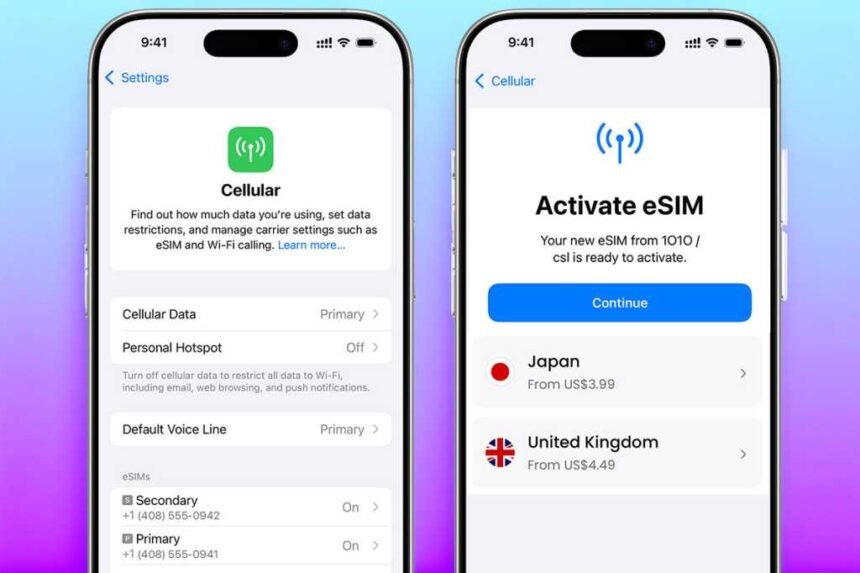
When it comes to setting up an additional eSIM on your iPhone, there are numerous advantages to consider. Whether you’re looking to save on international mobile data fees or enhance your security while using public Wi-Fi abroad, managing an eSIM can greatly benefit your travels. Each provider may have its own unique process, but understanding the basics of using an eSIM with your iPhone beforehand can help streamline the setup process.
If you find yourself setting up an eSIM upon arrival at your destination, the following tips can help you navigate the process smoothly. Depending on factors like your iPhone model, iOS version, carrier, and location, these guidelines can provide you with the necessary steps to get your eSIM up and running. While older iPhone models may vary slightly, the general setup process should remain consistent within the iPhone Settings app.
Before departure, it’s essential to research and select the best eSIM plan for your needs, download and install it either through the provider’s app or in iPhone Settings, and activate it upon reaching your destination. Many eSIM providers offer data-only plans, which can be cost-effective for messaging apps like WhatsApp and Messenger. However, if you require traditional voice calls and texts, you may need to consider purchasing a roaming add-on from your primary mobile service provider.
Some eSIM providers, such as Holafly and AloSIM, offer unique features like incoming text messages or a phone number for calls and texts in multiple area codes. Understanding your specific requirements can help you choose the right eSIM plan for your travel needs.
Choosing the Right eSIM Plan
There are numerous eSIM providers offering competitive plans, including popular options like Saily, Nomad, Ubigi, and GigSky. The process of selecting a plan is relatively similar across providers, allowing you to choose a plan through their website or app. It’s important to accurately assess your data needs to avoid overpaying for unused data.
According to Google, 1GB of data can provide around 20-30 minutes of daily web browsing and social media usage. However, activities like streaming 4K video can consume significantly more data. Understanding your data usage patterns can help you select the right plan and avoid unnecessary expenses.
When selecting a plan, consider the top-up options available to ensure you can easily add more data if needed. Additionally, be mindful of foreign transaction fees if the eSIM provider charges in a non-domestic currency, and consider using a multi-currency payment method to avoid additional charges.
Installing an eSIM on iPhone
After choosing your plan, follow the provider’s instructions to install the eSIM on your iPhone. Most eSIMs can be installed automatically through the provider’s app or via a QR code. In some cases, manual entry of eSIM information may be required, especially for devices or operating systems that do not support automatic installation.
It’s important to have internet connectivity during the installation process, so it’s advisable to complete the setup while still connected to your home network. While QR codes and manual entry methods are available as fallback options, most users can install the eSIM seamlessly through the provider’s app.
Activating eSIM on iPhone
Once the eSIM is installed, you’ll need to activate it in your iPhone’s Settings. This can be done before or during your trip, as the data plan will only activate once you reach your destination. Ensure you have internet access when activating your eSIM, as it may not be available immediately upon arrival.
To enable the eSIM, navigate to the Settings app on your iPhone, access the Cellular/Mobile Service option, and toggle the switch for the eSIM you wish to enable. You can also rename the eSIM to easily identify its purpose, such as “EU Travel” or “Business.”
Turning on eSIM Data Roaming
Enabling data roaming on your eSIM can help you avoid expensive fees when using mobile data in a foreign country. By turning on data roaming in your iPhone’s settings, you can access the internet, send messages, and use data-dependent apps while connected to a different mobile provider.
If data roaming is disabled for your primary SIM, you can set up your eSIM to handle data roaming duties. It’s important to toggle data roaming on only when you reach your destination to prevent unexpected charges. Additionally, consider top-up options provided by your eSIM provider to add more data if needed.
By following these steps, you can effectively manage your eSIM on your iPhone and enjoy seamless connectivity during your travels. Remember to consider additional features like VPNs and adblockers offered by some eSIM providers to enhance your data security and browsing experience.