

Wednesday, 18 Mar 2026
Subscribe
logo logo
  • Global
  • Technology
  • Business
  • AI
  • Cloud
  • Edge Computing
  • Security
  • Investment
  • More
    • Sustainability
    • Colocation
    • Quantum Computing
    • Regulation & Policy
    • Infrastructure
    • Power & Cooling
    • Design
    • Innovations
  • 🔥
  • data
  • revolutionizing
  • Stock
  • Investment
  • Future
  • Secures
  • Growth
  • Top
  • Funding
  • Power
  • Center
  • technology
Font ResizerAa
Silicon FlashSilicon Flash
Search
  • Global
  • Technology
  • Business
  • AI
  • Cloud
  • Edge Computing
  • Security
  • Investment
  • More
    • Sustainability
    • Colocation
    • Quantum Computing
    • Regulation & Policy
    • Infrastructure
    • Power & Cooling
    • Design
    • Innovations
Have an existing account? Sign In
Follow US
© 2022 Foxiz News Network. Ruby Design Company. All Rights Reserved.
Silicon Flash > Blog > Technology > Mastering SIM Swapping on Your iPhone: A Comprehensive Guide
Technology

Mastering SIM Swapping on Your iPhone: A Comprehensive Guide

Published October 3, 2025 By SiliconFlash Staff
Share
2 Min Read
Mastering SIM Swapping on Your iPhone: A Comprehensive Guide
SHARE

Switching eSIMs on Your Phone Made Easy

Swapping physical SIM cards on your smartphone can be a tricky task. The process involves hunting for a SIM tray tool or resorting to a paper clip to eject the SIM card tray. However, with the rise of eSIM technology, the hassle of changing SIM cards is a thing of the past.

Unlike physical SIM cards, eSIMs offer a more convenient way to manage multiple mobile plans on your device. With iPhones capable of storing up to eight eSIMs, switching between them is a breeze. Only two eSIMs can be active at a time, making it essential to streamline the number of eSIMs on your phone.

How to Manage Your eSIMs on iPhone

  1. Open the Settings app on your iPhone by tapping on the grey cog wheels icon.

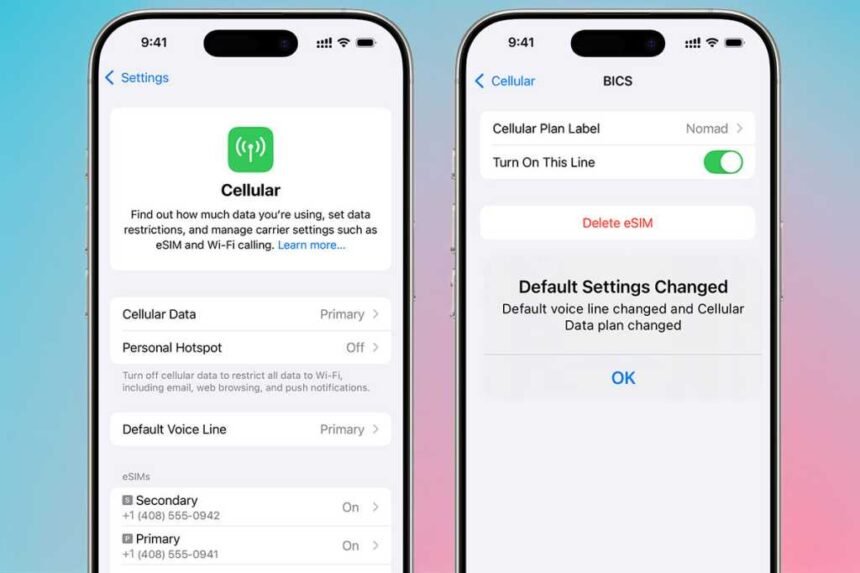
Once in the Settings menu, navigate to the “Cellular” or “Mobile Service” option, depending on your location.

In the Cellular or Mobile Service settings, you can view and manage your eSIMs under the “SIMs” section. Here, you can enable or disable eSIMs as needed.

To toggle an eSIM on or off, simply click on the desired eSIM and switch the toggle button to the on (green) or off (grey) position.

If you have more than two eSIMs installed, you will be prompted to turn off one to activate another.

Once enabled, your eSIM is ready for use without the need for physical removal or insertion.

eSIM technology is a cost-effective solution for international travelers looking to avoid hefty roaming charges. Explore the best eSIM options for various purposes, including travel, business, and security.

For detailed instructions on setting up and using eSIMs on your iPhone, refer to our comprehensive guide.


See also  Battle of the Screens: Comparing Sky Q, Glass, Stream, and Now for the Ultimate TV Experience
TAGGED: comprehensive, Guide, iPhone, Mastering, SIM, Swapping
Share This Article
Facebook LinkedIn Email Copy Link Print
Previous Article DOE Scraps .5B Clean Energy Projects in Democratic Strongholds DOE Scraps $7.5B Clean Energy Projects in Democratic Strongholds
Next Article Is Zoetis a Safe Bet in the Booming Pet Medicine Industry? Is Zoetis a Safe Bet in the Booming Pet Medicine Industry?
Leave a comment

Leave a Reply Cancel reply

Your email address will not be published. Required fields are marked *

Your Trusted Source for Accurate and Timely Updates!

Our commitment to accuracy, impartiality, and delivering breaking news as it happens has earned us the trust of a vast audience. Stay ahead with real-time updates on the latest events, trends.
FacebookLike
LinkedInFollow

Popular Posts

Protecting Your Firm from Agentic AI Security Threats: 7 Essential Strategies

AI agents, which are task-specific models designed to operate semi-autonomously or autonomously with given instructions,…

October 21, 2025

The Future of Duolingo: A Look Ahead to 1 Year from Now

Summary: 1. Duolingo's stock surged by over 200% before crashing 67% from its peak. 2.…

November 22, 2025

Edge Data Revolution: Exploring the Future of Industry

In today's digital landscape, the demand for edge data centers is rapidly growing, with a…

July 29, 2025

Google Pixel 10 Leads the Charge as AirDrop Makes its Debut on Android

Google is bringing a long-awaited feature to Android users that has been exclusive to iPhone…

November 21, 2025

Revolutionizing Cloud Technology: Exploring Alternative Cloud Solutions for a Dynamic Future

Summary: 1. Many organizations rushed to migrate to the cloud without a full understanding of…

December 20, 2025

You Might Also Like

Motorola Slimline: A Flagship Review
Technology

Motorola Slimline: A Flagship Review

SiliconFlash Staff
Exclusive Look: Nothing Phone (4a) Full Specifications Revealed
Technology

Exclusive Look: Nothing Phone (4a) Full Specifications Revealed

SiliconFlash Staff
Introducing Dyson’s Sleek PencilWash: A Revolutionary Wet Floor Cleaner Coming Soon
Technology

Introducing Dyson’s Sleek PencilWash: A Revolutionary Wet Floor Cleaner Coming Soon

SiliconFlash Staff
Navigating the Pitfalls: A Guide for SMBs in Application Modernization
Business

Navigating the Pitfalls: A Guide for SMBs in Application Modernization

Juwan Chacko
logo logo
Facebook Linkedin Rss

About US

Silicon Flash: Stay informed with the latest Tech News, Innovations, Gadgets, AI, Data Center, and Industry trends from around the world—all in one place.

Top Categories
  • Technology
  • Business
  • Innovations
  • Investments
Usefull Links
  • Home
  • Contact
  • Privacy Policy
  • Terms & Conditions

© 2025 – siliconflash.com – All rights reserved

Welcome Back!

Sign in to your account

Lost your password?