

Wednesday, 6 May 2026
Subscribe
logo logo
  • Global
  • Technology
  • Business
  • AI
  • Cloud
  • Edge Computing
  • Security
  • Investment
  • More
    • Sustainability
    • Colocation
    • Quantum Computing
    • Regulation & Policy
    • Infrastructure
    • Power & Cooling
    • Design
    • Innovations
  • 🔥
  • data
  • revolutionizing
  • Stock
  • Investment
  • Future
  • Secures
  • Growth
  • Top
  • Funding
  • Power
  • Center
  • technology
Font ResizerAa
Silicon FlashSilicon Flash
Search
  • Global
  • Technology
  • Business
  • AI
  • Cloud
  • Edge Computing
  • Security
  • Investment
  • More
    • Sustainability
    • Colocation
    • Quantum Computing
    • Regulation & Policy
    • Infrastructure
    • Power & Cooling
    • Design
    • Innovations
Have an existing account? Sign In
Follow US
© 2022 Foxiz News Network. Ruby Design Company. All Rights Reserved.
Silicon Flash > Blog > Technology > Mastering Your Google Pixel: 10 Tips & Tricks for Maximizing Your Smartphone Experience
Technology

Mastering Your Google Pixel: 10 Tips & Tricks for Maximizing Your Smartphone Experience

Published September 9, 2025 By SiliconFlash Staff
Share
2 Min Read
Mastering Your Google Pixel: 10 Tips & Tricks for Maximizing Your Smartphone Experience
SHARE
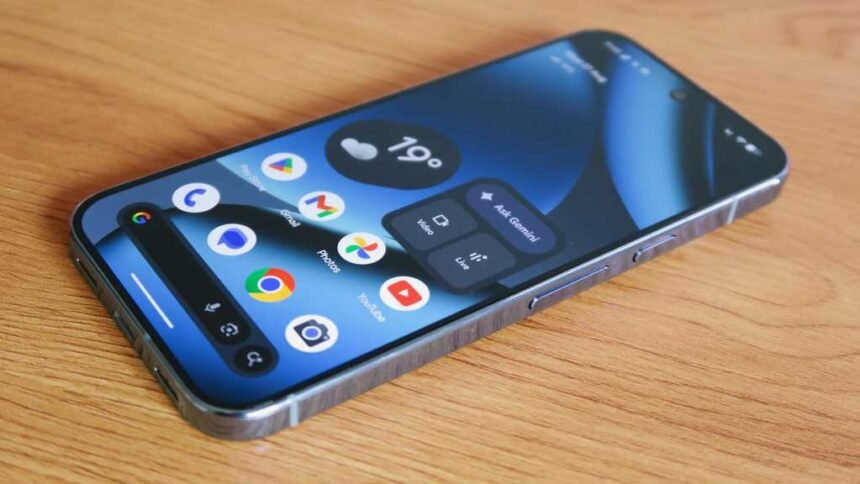
Google has recently launched its new line of Pixel phones for 2025, offering the best features yet. Whether you’re upgrading or switching to Pixel for the first time, here are some tips and tricks to help you make the most of the Android 16-based experience on the Pixel 10 series.

The Pixel 10 Pro and 10 Pro XL come with Pro Res Zoom, which enhances zoom capabilities up to 100x. To enable or disable Pro Res Zoom, follow the steps in the Camera app settings.

Another new feature is Calling Cards, which allow you to create personalized posters for key contacts in your address book. Customize the font styles, colors, and images to make your Calling Cards unique.

Check for AI-altered images with Content Credentials in Google Photos to verify the authenticity of images captured with generative AI tools like Pro Res Zoom.

Add AI-generated music to your recordings using the Recorder app on your Pixel 10. Choose from different vibes to enhance your voice notes with music.

Listen to web pages with the “Listen to this page” feature on Chrome, making it easier to consume content on the go.

Enhanced Now Playing on Pixel devices automatically sources album art for recognized tracks, enhancing the music identification experience.

Enable Advanced Protection on your Pixel for added security features like theft detection lock and Android Safe Browsing.

Reassign the power button’s main function to access the power menu easily on your Pixel 10.

Boost display resolution and refresh rate on your Pixel for a sharper and smoother viewing experience.

See also  Pixel Phones to Receive iPhone AirDrop Compatibility in Latest Update

By following these tips and tricks, you can maximize the capabilities of your Pixel 10 series phone and enhance your overall user experience. Stay tuned for more updates and features from Google in the future.

TAGGED: Experience, Google, Mastering, Maximizing, Pixel, Smartphone, Tips, Tricks
Share This Article
Facebook LinkedIn Email Copy Link Print
Previous Article Unveiling the Future of VC Investment: Insights from Disrupt 2025 Unveiling the Future of VC Investment: Insights from Disrupt 2025
Next Article Breathing Easier: The Power of Dreame’s PM20 for Cleaner Air Anywhere Breathing Easier: The Power of Dreame’s PM20 for Cleaner Air Anywhere
Leave a comment

Leave a Reply Cancel reply

Your email address will not be published. Required fields are marked *

Your Trusted Source for Accurate and Timely Updates!

Our commitment to accuracy, impartiality, and delivering breaking news as it happens has earned us the trust of a vast audience. Stay ahead with real-time updates on the latest events, trends.
FacebookLike
LinkedInFollow

Popular Posts

Revolutionary Resin: Advancing 3D Printing with Unique Additive and Subtractive Methods

Additive manufacturing, also known as 3D printing, typically follows a one-way process. A new resin…

November 15, 2025

Is Investing in United Parcel Service the Key to Financial Security?

Summary: 1. United Parcel Service (UPS) plays a crucial role in logistics by efficiently moving…

September 21, 2025

Crackdown on ‘Addictive’ Social Media Feeds: Washington Lawmakers Revive Push for Youth Safeguards

Avery Ping, a compassionate teenager from Olympia, had a keen eye for detecting when someone…

January 20, 2026

Empowering Networks: A Guide to Infoblox Solutions by Joshua Husk

Summary: Infoblox has appointed Joshua Husk as its new Chief Revenue Officer (CRO) to lead…

August 9, 2025

Comparing Small-Cap and Mid-Cap Stocks: A Value Investor’s Dilemma

Summary: 1. Vanguard Small-Cap Value ETF (VBR) and iShares SP Mid-Cap 400 Value ETF (IJJ)…

February 15, 2026

You Might Also Like

Motorola Slimline: A Flagship Review
Technology

Motorola Slimline: A Flagship Review

SiliconFlash Staff
Exclusive Look: Nothing Phone (4a) Full Specifications Revealed
Technology

Exclusive Look: Nothing Phone (4a) Full Specifications Revealed

SiliconFlash Staff
Introducing Dyson’s Sleek PencilWash: A Revolutionary Wet Floor Cleaner Coming Soon
Technology

Introducing Dyson’s Sleek PencilWash: A Revolutionary Wet Floor Cleaner Coming Soon

SiliconFlash Staff
Google Pixel 9: The Ultimate Value Over Pixel 10
Technology

Google Pixel 9: The Ultimate Value Over Pixel 10

SiliconFlash Staff
logo logo
Facebook Linkedin Rss

About US

Silicon Flash: Stay informed with the latest Tech News, Innovations, Gadgets, AI, Data Center, and Industry trends from around the world—all in one place.

Top Categories
  • Technology
  • Business
  • Innovations
  • Investments
Usefull Links
  • Home
  • Contact
  • Privacy Policy
  • Terms & Conditions

© 2025 – siliconflash.com – All rights reserved

Welcome Back!

Sign in to your account

Lost your password?