Every business leader wants their app to attract users, scale smoothly, and deliver measurable ROI. Yet, studies show that the majority of apps fail within the first year, not because of bad ideas, but because of poor architecture choices hidden beneath the surface.
Think of mobile app architecture as the operating system for your app’s success: it dictates speed, reliability, security, and adaptability. Get it right, and your team builds faster, your costs stay predictable, and your product evolves with market demands. Get it wrong, and you’re stuck with downtime, mounting technical debt, and frustrated customers who move on.
This guide is designed for decision-makers who want to bridge the gap between business goals and technical execution through mobile app development solutions. So you can invest in an app architecture that creates a real competitive advantage.
Key Takeaways
What it covers
- The fundamentals of mobile app architecture and why it matters.
- Native iOS, Android, and cross-platform architecture choices—and how to decide.
- Factors to consider when designing architecture (UX, scalability, maintainability, security, budget).
- Practical guidance on choosing the right architecture.
Key stats & facts
- Surveys state that 25% of users open an app once and then abandon it completely.
- A consistent and well-defined architecture helps new developers get up to speed quickly.
What is Mobile App Architecture?
Mobile app architecture is the structural design of a mobile application, which outlines how different components (design, logic, and data) communicate seamlessly, adapt to growth, and stay secure.
It is the same as the architectural mapping (showing how the foundation, walls, plumbing, and electrical systems integrate) you see before any real estate development project starts.
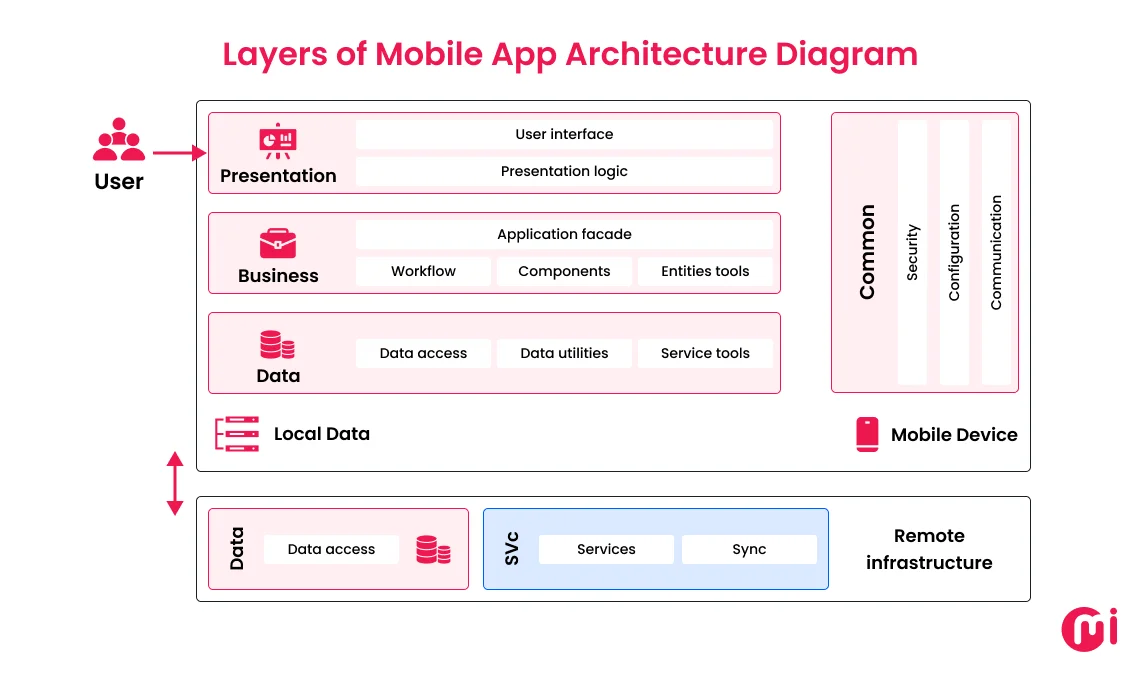
Layers of Mobile App Architecture Diagram
Mobile app architecture generally consists of three main layers: the presentation layer, the business layer, and the data layer. Each layer takes care of specific functions. Let’s know more:
The Presentation Layer
In mobile app architecture, the presentation layer covers the front-end part. It helps to define the user interface that helps you navigate the app.
For example, in an AI-powered color visualization app solution, the presentation layer covers a wall image on your app screen, showing you options to select colors to overlay on the wall, and more. In short, it’s the layer that takes user inputs and presents output achieved through lower layers.
The Business Layer
The business layer comprises the core application logic and rules that govern the application. It covers components for application workflows, entities, and logic for operations.
Be it data validation, processing, notifications, or background functions, this business layer acts as the “brain” of the application.
For example, in that same AI-powered color visualization app, the business layer triggers when a user selects a paint shade. This layer processes the input, applies the AI algorithm to match lighting conditions and textures, and determines how the color will realistically appear on the wall.
In short, the business layer manages the application’s rules and workflows.
The Data Layer
As the name suggests, this layer handles data operations within the app. It has components for data access, service tools, and APIs. These work together for data retrieval.
It provides the mechanism for saving, retrieving, and accessing data from databases, local storage, and external services.
For example, in the AI-powered color visualization app, the data layer manages everything from fetching wall images stored in the cloud to retrieving available color palettes from a database.
The main work of the data layer is to ensure that the data flows smoothly between the app and its databases, APIs, or external services.
Types of Mobile App Architecture
There are mainly three types of mobile app architecture that you should know about: layered, microservices, and monolithic. Let’s learn about these architectures to make an appropriate choice for your mobile app development project:
Layered Architecture
Layered architecture structures the application into distinct layers, specific to client, presentation, business, integration, and data. Through this, it promotes modularity and separation of concerns, enabling the mobile app to smoothly maintain and scale. When choosing this architecture, the developer has to work carefully; otherwise, it can make layers tightly coupled.
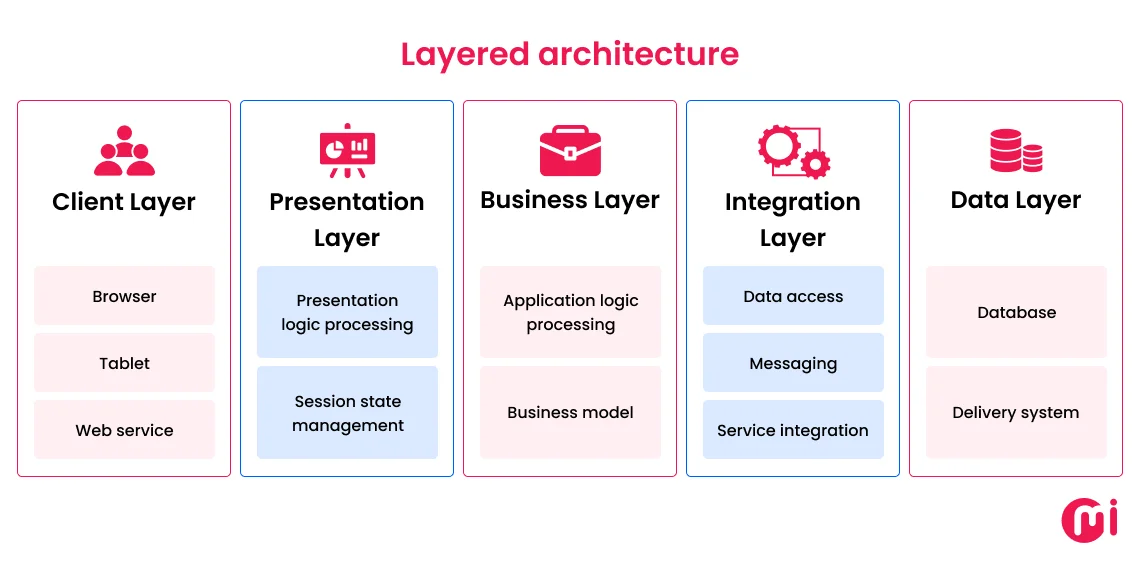
You can choose a layered architecture for a low to medium-complexity-based mobile app development project.
| Pros | Cons |
| Clear separation of concerns makes apps easier to maintain | Can slow performance if layers become too rigid |
| Scalable and adaptable to feature expansion | Increased complexity in managing multiple layers |
| Easier testing and debugging due to modular design | Overhead in communication between layers |
| Ideal for low-to-medium complex apps | It may overkill for complex apps |
Microservices Architecture
Microservices architecture for mobile apps helps to structure an application as a collection of small, independent, and loosely coupled components/services. In this, each is responsible for a specific business function with fault isolation.
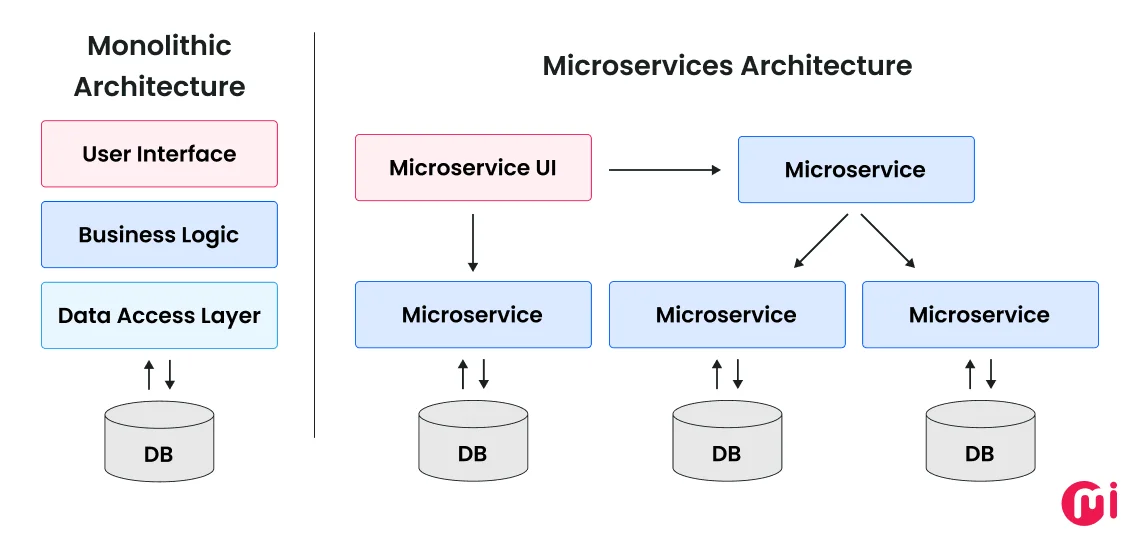
Although components are independent, they do communicate with each other through lightweight APIs. They are popular for complex application development. Because with microservices, you can handle each service independently, whether developing, deploying, or scaling it.
| Pros | Cons |
| Highly scalable. Each service can scale independently | More complex to design and manage than monolithic |
| Enables faster development and deployment cycles | Requires strong DevOps and infrastructure setup |
| Fault isolation. One failing service doesn’t crash the entire app | Higher cost of maintenance and monitoring |
| Best for large apps with diverse features or high traffic | Communication between services can add latency |
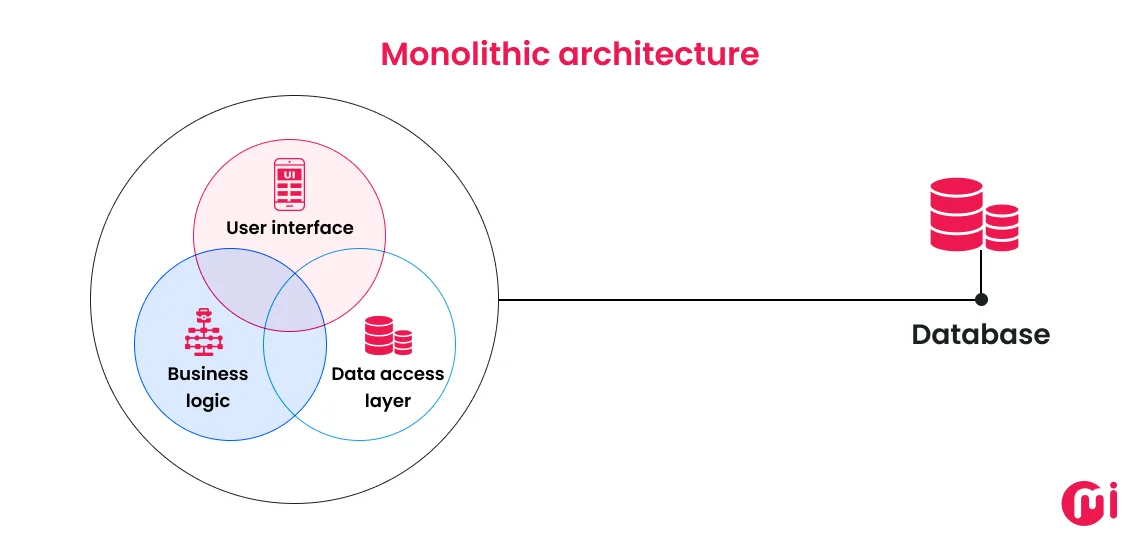
Monolithic Architecture
This architecture may sound simple to use during development, but when the app scales, it can become difficult to maintain and scale once the app crosses a certain size.