

Friday, 6 Mar 2026
Subscribe
logo logo
  • Global
  • Technology
  • Business
  • AI
  • Cloud
  • Edge Computing
  • Security
  • Investment
  • More
    • Sustainability
    • Colocation
    • Quantum Computing
    • Regulation & Policy
    • Infrastructure
    • Power & Cooling
    • Design
    • Innovations
  • 🔥
  • data
  • revolutionizing
  • Stock
  • Investment
  • Future
  • Secures
  • Growth
  • Top
  • Funding
  • Power
  • Center
  • technology
Font ResizerAa
Silicon FlashSilicon Flash
Search
  • Global
  • Technology
  • Business
  • AI
  • Cloud
  • Edge Computing
  • Security
  • Investment
  • More
    • Sustainability
    • Colocation
    • Quantum Computing
    • Regulation & Policy
    • Infrastructure
    • Power & Cooling
    • Design
    • Innovations
Have an existing account? Sign In
Follow US
© 2022 Foxiz News Network. Ruby Design Company. All Rights Reserved.
Silicon Flash > Blog > Technology > Android 17: The Ultimate Guide to Split UI Elements
Technology

Android 17: The Ultimate Guide to Split UI Elements

Published January 16, 2026 By SiliconFlash Staff
Share
2 Min Read
Android 17: The Ultimate Guide to Split UI Elements
SHARE

Insights provided by Intelligent Insights AI

To Summarize:

  • A recent leak suggests that Google plans to separate Wi-Fi and mobile data controls in Android 17, reversing a previous unpopular decision.
  • The update may also introduce a dual-pane interface for Notification and Quick Settings menus, similar to iOS and other Android manufacturers.
  • While the split UI will likely be optional for smartphones, it appears mandatory for tablets and foldables, sparking mixed reactions among users.

Google is gearing up to address user feedback with the upcoming release of Android 17, but there are some mixed feelings surrounding the changes.

It’s been a while since the initial developer preview of Android 16 back in November 2024, making the anticipation for Android 17 even higher.

An early insight from tipster Mystic Leaks sheds light on two significant tweaks expected in Google’s next mobile OS, sparking a range of reactions.

Separating Data Controls

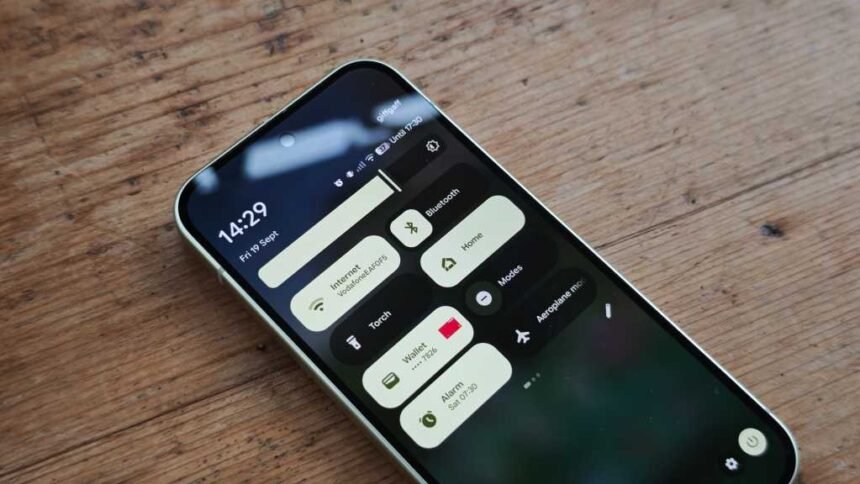
According to the leak, Google is set to revert a past UI modification by splitting the Wi-Fi and mobile data controls, allowing users to toggle each separately from the drop-down menu.

This change is likely to be welcomed by those who have struggled with unreliable Wi-Fi connections in the past.

Anyron Copeman / Foundry

On the other hand, Google’s decision to split the Notification and Quick Settings menus has raised some concerns. Users will now need to swipe down from different corners for toggles and messages, respectively.

While some prefer a more integrated approach, others appreciate the separation between notifications and settings. This move aligns Google with other Android manufacturers who have adopted similar dual-pane interfaces.

See also  Powerful Performance: The Ultimate Gamer's Choice - Jisulife Table Fan Pro3 Review

Although the split UI will be optional for smartphones, tablet and foldable users may be required to use this layout, leading to varying opinions among consumers.

As we await the public beta release of Android 17, hands-on experience will be crucial in assessing the impact of these interface changes.

TAGGED: Android, elements, Guide, Split, Ultimate
Share This Article
Facebook LinkedIn Email Copy Link Print
Previous Article Unlock Millionaire Status with this  Stock Opportunity Unlock Millionaire Status with this $15 Stock Opportunity
Next Article Palo Alto Networks Bolsters Firewall Security with Denial-of-Service Patch Palo Alto Networks Bolsters Firewall Security with Denial-of-Service Patch
Leave a comment

Leave a Reply Cancel reply

Your email address will not be published. Required fields are marked *

Your Trusted Source for Accurate and Timely Updates!

Our commitment to accuracy, impartiality, and delivering breaking news as it happens has earned us the trust of a vast audience. Stay ahead with real-time updates on the latest events, trends.
FacebookLike
LinkedInFollow

Popular Posts

Discover the Hidden Gem: The Space Stock that’s 1500x Cheaper than the 2026 SpaceX IPO

Summary: SpaceX plans to conduct an IPO in 2026 at a valuation of $1.5 trillion,…

January 10, 2026

Steal of the Season: AirTags on Sale for Only £26/$18!

Looking to keep track of your belongings while traveling? Consider investing in AirTags, especially if…

November 25, 2025

Reevaluating the UK’s Vision for AI Data Centres: Time for a Rethink?

In the realm of AI infrastructure, the UK Government introduced AI Growth Zones (AIGZ) to…

October 31, 2025

Riding the Wave: Top 5 Robinhood Stocks to Start 2026 Strong

Summary: 1. Robinhood has empowered a new generation of retail investors who hold significant influence…

January 4, 2026

Progressive Voices Embrace Bluesky while Standing Firm on Key Issues, Pew Research Finds

Analysis of Left-Leaning Social Media Accounts Joining Bluesky Recently, many prominent left-leaning social media accounts…

May 31, 2025

You Might Also Like

Motorola Slimline: A Flagship Review
Technology

Motorola Slimline: A Flagship Review

SiliconFlash Staff
Exclusive Look: Nothing Phone (4a) Full Specifications Revealed
Technology

Exclusive Look: Nothing Phone (4a) Full Specifications Revealed

SiliconFlash Staff
Introducing Dyson’s Sleek PencilWash: A Revolutionary Wet Floor Cleaner Coming Soon
Technology

Introducing Dyson’s Sleek PencilWash: A Revolutionary Wet Floor Cleaner Coming Soon

SiliconFlash Staff
Navigating the Pitfalls: A Guide for SMBs in Application Modernization
Business

Navigating the Pitfalls: A Guide for SMBs in Application Modernization

Juwan Chacko
logo logo
Facebook Linkedin Rss

About US

Silicon Flash: Stay informed with the latest Tech News, Innovations, Gadgets, AI, Data Center, and Industry trends from around the world—all in one place.

Top Categories
  • Technology
  • Business
  • Innovations
  • Investments
Usefull Links
  • Home
  • Contact
  • Privacy Policy
  • Terms & Conditions

© 2025 – siliconflash.com – All rights reserved

Welcome Back!

Sign in to your account

Lost your password?